DOJO: Applied Cybersecurity Education In The Browser
Connor Nelson Arizona State University connor.d.nelson@asu.edu
Yan Shoshitaishvili Arizona State University yans@asu.edu
ABSTRACT
This paper introduces DOJO, a state-of-the-art, open-source learning platform for hands-on cybersecurity education that aims to minimize barriers for both students and instructors. DOJO draws insight and inspiration from the Capture The Flag (CTF) community, which has pioneered the use of hands-on challenges to teach cybersecurity concepts. DOJO improves upon the accessibility and usability of existing platforms by making available a pre-configured, fullfeatured learning environment immediately accessible from any device in the browser. Students are able to write code, interact with a shell, explore complex network configurations, debug processes and kernel modules, and more, all from the browser. Instructors can easily deploy DOJO to their own servers with a single docker run command, or use our already-deployed instance to host their own challenges or already existing challenges with a single git push command. DOJO has been successfully used in multiple university courses and workshops, and is available for free to the world, with more than 10,000 students from around the world having already benefited from using DOJO. In this paper, we discuss the infrastructure, design, implementation, and effectiveness of DOJO, and compare it to related work.
CCS CONCEPTS
• Applied computing → Education; Interactive learning environments; • Security and privacy → Systems security; Software and application security.
KEYWORDS
Cybersecurity Education, Capture The Flag, Infrastructure, System Design, Accessibility
ACM Reference Format:
Connor Nelson and Yan Shoshitaishvili. 2024. DOJO: Applied Cybersecurity Education In The Browser. In Proceedings of the 55th ACM Technical Symposium on Computer Science Education V. 1 (SIGCSE 2024), March 20– 23, 2024, Portland, OR, USA. ACM, New York, NY, USA, 7 pages. https: //doi.org/10.1145/3626252.3630836
1 INTRODUCTION
In the rapidly evolving landscape of software development, containerization has been instrumental in ensuring portability and
Permission to make digital or hard copies of all or part of this work for personal or classroom use is granted without fee provided that copies are not made or distributed for profit or commercial advantage and that copies bear this notice and the full citation on the first page. Copyrights for components of this work owned by others than the author(s) must be honored. Abstracting with credit is permitted. To copy otherwise, or republish, to post on servers or to redistribute to lists, requires prior specific permission and/or a fee. Request permissions from permissions@acm.org.
SIGCSE 2024, March 20–23, 2024, Portland, OR, USA
© 2024 Copyright held by the owner/author(s). Publication rights licensed to ACM. ACM ISBN 979-8-4007-0423-9/24/03. . . $15.00 https://doi.org/10.1145/3626252.3630836
reproducibility of production, testing, and more recently, development environments. By bundling all of the dependencies required for a system within a single portable container, developers can effortlessly set up an identical version of a live working system, implement modifications, validate them, and deploy to production, ensuring a consistent behavior across different environments.
The profound impact of this approach is not limited to production and testing. Developers are now leveraging containerized development environments to streamline and standardize their workflows [16]. This paradigm offers immediate access to a fully configured development environment, with all essential tools, from compilers and linters to debuggers and profilers, pre-installed and set to go. Such an environment mitigates the challenges of individualized setups and fosters team consistency, especially aiding novice developers who might be daunted by the intricate setup processes.
GitHub Codespaces, a cloud-based service, exemplifies this trend by offering developers the capability to set up their development environment, filled with necessary tools, on a robust machine that can be accessed universally [15]. This not only expedites the code development and testing process but also enables quick onboarding, particularly useful when working with various devices or when switching to a new one.
A parallel can be drawn in the realm of applied education, where such containerized environments are being integrated [20, 21]. Novice learners, akin to new developers, often face challenges in setting up their learning environments, which may serve as deterrents to their educational pursuits. Addressing these barriers becomes paramount, especially in fields like cybersecurity, where the demand for trained professionals outstrips the supply due to a lack of hands-on experience and effective training methodologies [10, 18].
Given the pressing need for effective learning environments and drawing inspiration from the containerization wave in software development, we introduce DOJO, a platform designed specifically to facilitate hands-on cybersecurity education. DOJO adopts principles from the realm of Capture The Flag competitions [11], wherein learners are tasked with solving challenges, thereby obtaining flags as evidence of their newfound skills. Instead of imposing the onus of environment setup on learners, DOJO offers a pre-configured environment, available through both browsers and SSH, allowing students to dive into hands-on cybersecurity challenges instantly. In contrast to existing platforms, our primary focus is to allow students to execute every step—discovery, implementation, and debugging—of even the most advanced and technical challenges directly within the DOJO environment.
DOJO is freely available for use athttps://pwn.college/ and is open-source at https://github.com/pwncollege/dojo. Educators can seamlessly launch their own version of DOJO on their own hardware with a simple docker run or establish a private dojo on our hosted platform using just a git push, incorporating their own challenges or leveraging our existing ones. Over the last 5 years, DOJO has been used by more than 10,000 students from over 100 counties and over 100 academic institutions. We know of at least 10 courses around the world that have used DOJO as a critical component of their curriculum. In total, DOJO has facilitated more than 1,000,000 challenge solves, and has attracted thousands of learners with no course requirement or incentive other than the desire to learn.
In this paper, we explore the architecture and ethos behind DOJO, specifically focusing on the infrastructure itself rather than the educational content that may be hosted within it. Our insights, shaped by its creation and enriched by our personal interactions with it, are further enhanced by direct feedback from students. This offers readers an authentic look into students' experience with using DOJO. While our lens is primarily on applied cybersecurity education, the insights shared may have broader relevance.
2 RELATED WORK
There are various projects that address the challenge of providing students with access to a learning environment that enables them to work on hands-on challenge problems and experiment with cybersecurity concepts. This section delves into the relevant existing works and compares them with our contribution. Moreover, we have provided a summary of the significant features of our work, in relation to notable projects in the field, in Table 1.
Capture The Flag Projects. Capture The Flag (CTF) is a cybersecurity competition style in which flags (represented by secret data stored in privileged areas of a system) must be captured (disclosed and redeemed for credit) by participants through compromising the security of some system. Recently, CTF has been increasingly used in cybersecurity education [1, 6, 12, 22, 24].
Among CTF projects, picoCTF [7] is the most similar to D0J0. It offers a challenge frontend (to view what challenges are available), backend (to run challenges), and working environment (to work on challenges). A key difference from DOJO is that the challenge environment and working environment are separate. The provided working environment grants users remote capabilities when interacting with the challenge (e.g., over netcat), reducing introspection capabilities and hampering student abilities to reason about what is happening. Additionally, the working environment is only accessible through a simple in-browser terminal (a solution which DOJO once used, but has since iterated and improved on), not SSH (advanced users may prefer), VS Code (for editing code), or a desktop environment (for graphical interface tools). Furthermore, the project is no longer under active open-source development, although a public version of the infrastructure is available and maintained, especially for the yearly picoCTF competition.
"Its cool that DOJO provides an environment for solving challenges and without it, I would have to set up my own environment (creating a VM, installing necessary packages, fighting to getting correct dependencies and so on). This is where picoCTF falls behind (although its also a good website for CTF)."
Student Feedback
CTFd [8] is a very popular frontend for running CTFs. However, all though some features for running challenges are available, it is not the primary focus of the open-source project. Furthermore, a working environment is not provided. Root The Box [5] and fbCTF [14] are other popular frontends. kCTF [17] is a popular backend for running challenges on Kubernetes, but does not provide
| Project | Layer | Openness | Interaction | Isolation | Environment |
|---|---|---|---|---|---|
| Pingle Bentend Works |
The following the state of the state of the state of the state of the state of the state of the state of the state of the state of the state of the state of the state of the state of the state of the state of the state of the state of the state of the state of the state of the state of the state of the state of the state of the state of the state of the state of the state of the state of the state of the state of the state of the state of the state of the state of the state of the state of the state of the state of the state of the state of the state of the state of the state of the state of the state of the state of the state of the state of the state of the state of the state of the state of the state of the state of the state of the state of the state of the state of the state of the state of the state of the state of the state of the state of the state of the state of the state of the state of the state of the state of the state of the state of the state of the state of the state of the state of the state of the state of the state of the state of the state of the state of the state of the state of the state of the state of the state of the state of the state of the state of the state of the state of the state of the state of the state of the state of the state of the state of the state of the state of the state of the state of the state of the state of the state of the state of the state of the state of the state of the state of the state of the state of the state of the state of the state of the state of the state of the state of the state of the state of the state of the state of the state of the state of the state of the state of the state of the state of the state of the state of the state of the state of the state of the state of the state of the state of the state of the state of the state of the state of the state of the state of the state of the state of the state of the state of the state of the state of the state of the state of the state of the state of the state of the state of the state of the | Down Net of Sold In Control In Control |
Solated parties | 24. 19. 19. 19. 19. 19. 19. 19. 19. 19. 19 | |
| CTFd CTFd Enterprise picoCTF fbCTF Root The Box kCTF\niCTF | • 0 - • • 0 • • • • 0 |
• • • • • • • • • • • • • • • • • • • | • • • - • • • - • • • - • • • - • • • - |
• - · · · · · · · · · · · · · · · · · · | |
| OverTheWire pwnable.kr pwnable.tw archive.ooo |
••• ••• •• - |
- • • • · · · · · · · · · · · · · · · · | 0 0 • • • • • • • • • • • • • • | • | |
| SecDevOps@Cuse Alpaca SecGen CyTrONE KYPO |
- 0 0 - 0 0 - 0 0 0 0 0 |
0 - • 0 - • 0 - • 0 - • |
0000 000- 000- 0000 |
• - | 0 0 |
| TryHackMe TryHackMe Premium HackTheBox HackTheBox VIP RET2 Wargames |
••• ••• ••• |
- • • • • · · · · · · · · · · · · · · · | • 0 0 0 • 0 0 0 • 0 0 - |
• = • = • = • = |
0 0 - 0 - 0 0 0 0 - 0 - 0 0 0 0 0 0 0 0 0 - |
| DOJO | ••• | ••• | 0000 | •• | ••••• |
$\bullet$ = provides property; $\bullet$ = partially provides property; - = does not provide property;
Table 1: Features of Cybersecurity Education Projects. The projects are grouped into, in order, CTF Platforms, Wargames, CyberRange Projects, and Commercial Training Platforms, as described in Section 2.
a frontend. iCTF [33] allows users to run an attack-defense CTF, in which participants exploit each other participant's vulnerable services, and likewise defend against attack.
Wargame Platforms. Wargames are collections of sometimes-educational challenges available for participants to tackle. OverThe-Wire [35] and pwnable.kr [27] offers participants the ability to access a number of challenges through SSH. pwnable.tw [28] and archive.ooo [25] only allow remote interactions (e.g., over netcat), and do not provide a working environment. While the former two offer some visibility into the challenge environment, the latter two are modeled strictly from the perspective an external actor. An understanding of the environment is only made possible through this remote interaction, and file downloads of the underlying programs. In the case of all four of these projects, and in contrast to DOJO, introspection and tooling are not a focus: a local working environment is necessary.
Cyber Range Projects. Cyber Ranges are designed as environments for exploiting software in a manner that more closely mirrors real-world scenarios. They often target known vulnerabilities in actual software, making them a more realistic training ground compared to the more game-like nature of CTFs.
KYPO [34] most closely aligns with DOJO as it combines the challenge and work environments. Students move from an initial scenario accessible via SSH or an in-browser desktop to larger challenge environments. However, KYPO only supports features required by the challenges themselves, and excludes critical debugging and troubleshooting functionality. This design reflects the constraints of real-world situations, but hampers the ability for confused students to fix their understanding. In contrast, DOJO optimizes for transparency and debuggability within the challenge environment, giving students critical tools to maximize understanding. Additionally, KYPO's infrastructure is resource-intensive: catering
to a large student cohort is challenging because KYPO relies on individual virtual machines for every student instead of D0J0's more efficient container approach [26]. For scale, the KYPO project recommends that students run virtual machines locally, forgoing the benefits of a turnkey, centralized environment.
CyTrONE [3] is a challenge hosting backend, but it lacks a centralized working environment and even a challenge frontend (instead, it uses the Moodle Learning Management System [23]). SecDevOps@Cuse [31] places some emphasis on including security tools in its working environment, but does so without a challenge frontend. Projects like Alpaca [13] and SecGen [30] craft challenge environments dynamically from vulnerability datasets, but do not focus on students' working environments.
Commercial Training Platforms. TryHackMe [32] has both a challenge environment, and a working environment. Challenge environments vary dramatically from challenge to challenge. For some challenges, the challenge environment serves as the working environment. However, in cases where the challenge environment is either remote (e.g., some service is only accessible over the network), or tooling is insufficient within the local challenge environment, an additional dedicated working environment is provided. Within the working environment, students have access to a standardized set of tools and privileged access to further customize the environment. The dedicated working environment may only be accessed from an in-browser desktop. HackTheBox [4] has separate challenge environments and working environments. The working environment contains a standardized set of tools, with the ability to persist a student's working data across challenges, and privileged access to further customize the environment. However, the working environment is not the challenge environment. It is an environment from which students can work on the challenge, with the same effective capabilities that local working environments have. This prevents full challenge introspection and debugging, as enabled by DOJO. RET2 Wargames [29] has a tightly integrated challenge and working environment. Students work in a web environment which simulates standard tools in order to solve the challenge. However, arbitrary tools are not available, and because tools are simulated, the transferability of learned knowledge beyond the simulated environment may be hampered.
3 DOJO DESIGN
Our priority in designing DOJO was to maximize the ease of challenge access for students, and of challenge deployment for instructors. In doing so, we leveraged a number of existing technologies, focusing on smooth integration. DOJO takes inspiration from developments in cybersecurity competition, specifically from Capture The Flag competitions [11], and expands them to accomplish our goal of democratizing cybersecurity education access.
3.1 Challenge Environments
DOJO heavily extends the CTFd framework, which is popular for facilitating simple one-off "Jeopardy-style" CTFs [8]. CTFd manages user accounts, tracks flag submissions, and provides a basic web interface which lists the challenges and displays a scoreboard. DOJO builds upon CTFd to provide a long-term comprehensive environment for students.
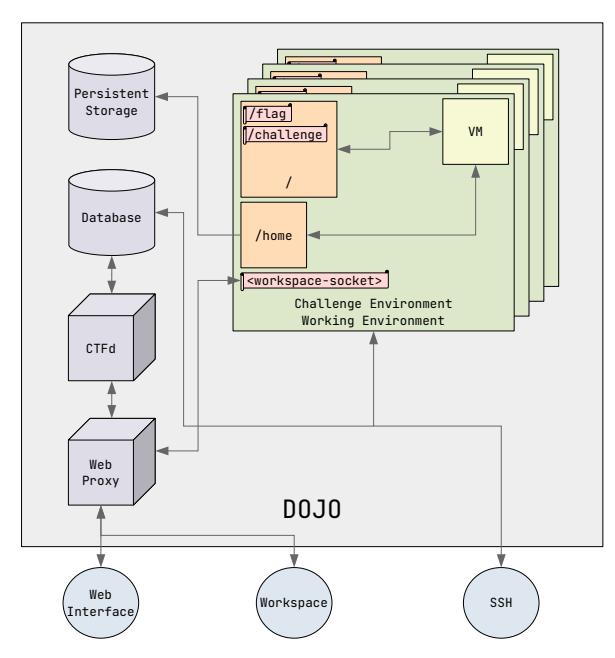
Figure 1: The overall design of DOJO. Student environments are isolated in containers, managed by a series of other components. For coursework that requires it, DOJO can run nested virtual machines (for example, with vulnerable kernel configurations).
In standard CTFs, participants are given a downloadable challenge program or instructions for how to communicate with a remote running challenge (for example, nc
Inspired by CTFs, DOJO stores a /flag file in each container, which students access by solving the challenge and then submit to DOJO to count the solve. The /flag file is only accessible to challenge programs, which have SUID permissions to enable this access. DOJO ensures that no other files are SUID, reducing the risk of inadvertent flag retrieval due to environment misconfiguration. This method highlights the advantages of a centralized educational platform over local setups where students might have unrestricted access. Further, it immediately conveys to students when they have completed the challenge.
"DOJO removes a lot of the frustration involved with "it compiles on my machine, but not the grader's"." Student Feedback
3.2 Working Environments
Extensive Tooling. Students work on challenges in the same environment that hosts the challenge. These containers come preconfigured with essential security tools. Currently the default DOJO challenge environment comes with ipython, tmux, strace, gdb, pwntools, pwndbg, gef, radare2, ghidra, wireshark, nmap, scapy, requests, curl, and many other tools. The goal is to allow students
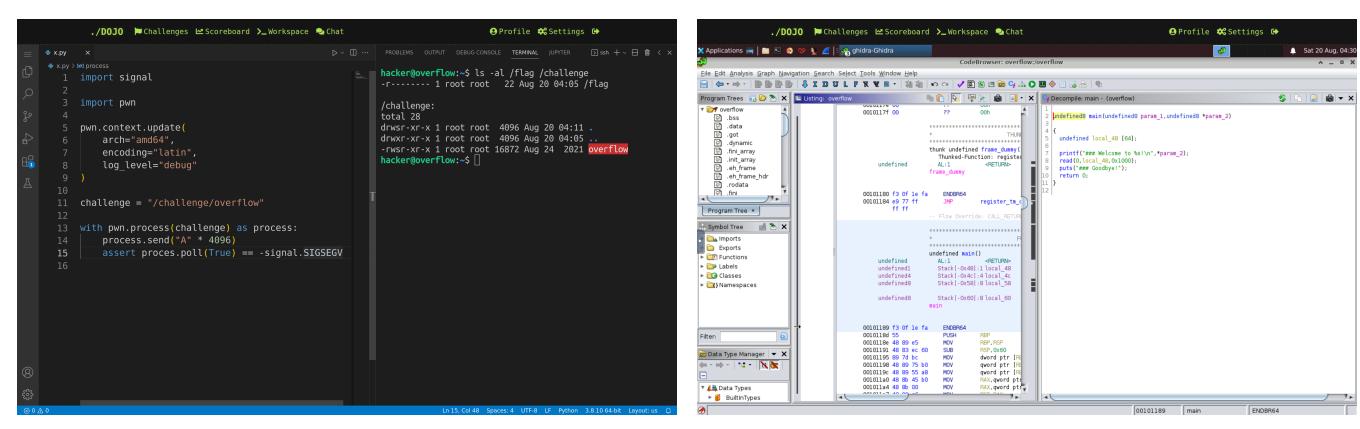
Figure 2: DOJO's browser-based workspace. Left: VS Code, text editor alongside a terminal. Right: GUI reverse engineering tool.
to execute every step of the challenge—discovery, implementation, and debugging—directly within the DOJO environment.
"Hacking very often comes down to the most nitty gritty of details, and often you need specific tooling to save time. Giving someone a set environment where all of those details are controlled, and where they know they have all the tools they need, is a godsend for learning." Student Feedback
This setup ensures consistent environments for students and allows new tools to be added (for example, to support new types of challenges) by modifying the Dockerfile of the challenge environment, which makes the change immediately available to all students. This spares students from potential frustration in tooling setup and eliminates time instructors might spend assisting students with installation problems.
Privileged Mode. DOJO also offers a privileged mode when starting the challenge. In this mode, students work in an environment similar to the standard mode, but with additional sudo privileges and a placeholder flag. With this root access, students can fully analyze and debug a challenge program, which is otherwise not possible in some circumstances. For example, if challenge behavior is strictly dependent on being able to access the flag (for example, to encrypt it), then any debugging of that challenge must be done with flag access capabilities. This mode enables this without otherwise leaking the actual solution flag until the student re-runs their final solution in the standard mode, ensuring the integrity of the challenge.
Persistent Home Directory. In order to improve usability when switching between challenges and challenge modes, DOJO persists the student's home directory across all challenge environments. This persistance is essential as it allows students to store previous solutions (for reference and expansion), as well as custom scripts and tools. Critically, the home directory is mounted with the nosuid option, which prevents students from smuggling a root-owned SUID binary across different environments.
"I really like the infrastructure, and I much appreciate that you have permanent storage! Even though I have most things set up locally, I still work in DOJO most of the time." Student Feedback
3.3 Environment Access
SSH. Students may access their challenge environment after starting a challenge in one of three ways. The first way is through SSH. Students may upload a public key within the DOJO web-interface, allowing them to SSH into DOJO and transfer files with scp.
"The fact that I can SSH into DOJO during lunch breaks makes this platform stand out to me." Student Feedback
VS Code. The second way is through an Visual Studio Code running in the DOJO and exposed through the student's web browser [9], as seen in Figure 2. VS Code provides a powerful text editor, command line terminal, file explorer (including file upload and download), and a plugin interface with many community-created plugins.
"One of the biggest reasons I use VS Code to interact is because my device becomes slow if I run a VM." Student Feedback
In-Browser Desktop Environment. The third way is through an In-Browser Desktop Environment, as can be seen in Figure 2. This provides students with the ability to run arbitrary graphical user interface programs (which is relevant in advanced security curricula, such as Software Reverse Engineering) from within the browser. This method makes it possible for students to learn entirely through a student's browser, enabling full DOJO access not only from laptops, but also tablets or other mobile devices, entirely removing software or hardware barriers to entry from the student's perspective. Education is as simple as starting a challenge, and then immediately having access to a full computing environment, all from within the browser.
"I can't stress enough how helpful DOJO was. Being able to access DOJO from anywhere (home, work, etc.) meant I could pick up where I left off." Student Feedback
3.4 Challenge Virtualization
While docker works for a large number of challenge use-cases, it may not always provide enough capabilities for some challenges. For example, a standard unprivileged container cannot arbitrarily manage networking resources, hampering education in network security. DOJO has two answers to these limitations.
User Namespaces. DOJO supports nested namespace virtualization, enabling challenges to create arbitrary networking topologies, process isolation, and permission models (among other namespace features). This requires DOJO to modify docker's seccomp filter to allow relevant system calls (e.g., unshare) and to create a user namespace to grant necessary Linux capabilities to the challenge without compromising the security of the overall DOJO system.
While this isintended to be secure according to the namespace security model, unprivileged user namespaces have previously caused serious kernel vulnerabilities. As the implementation of this Linux subsystem continues to mature, more vendors have been willing to trust this configuration, and it seems likely that these features may be supported by default in a future version of docker.
Virtual Machines. Nested namespace virtualization does not support all challenge use-cases. Namespaced processes operate within a single shared kernel, which cannot securely support challenges including, for example, vulnerable Linux kernel modules. Furthermore, some scenarios might demand the operation of an entirely different kernel—for example, to run varying versions of Linux, or even a completely different OS like Windows or MacOS. To overcome these limitations, DOJO supports both virtualization and system emulation within the user container.
Critically, our virtual machine implementation transparently shares the container's file system. This means that all files are automatically shared between the container and virtual machine, and that modifications in one environment are immediately reflected in the other. This includes the persistent home directory (see Section 3.2). This feature eliminates hurdles of transferring solution and debug code into traditionally-minimal environments running in vulnerable kernels, which has traditionally frustrated students tackling such problems. To our knowledge, DOJO is the first cybersecurity environment with this capability.
DOJO uses QEMU [2], with kvm providing near-native virtualization performance, 9p supporting the transparent filesystem mapping, and SLIRP mapping networking between the virtual machine and container. Connecting to the virtual machine happens transparently over SSH. Debugging mode automatically connects to the QEMU gdb stub and loads debug symbols from the virtualized kernel.
"For the kernel challenges, the DOJO infrastructure was very helpful. I could probably have figured out how set up QEMU and stuff locally, but it would have taken time and effort and I don't think I would have gotten to it from never having tried anything kernel before." Student Feedback
3.5 Instructor Capabilities
Environment Sharing. One unique capability is bidirectional information sharing. Instructors can broadcast their desktop environment (described in Section 3.3) to students, allowing them to view what the instructor is doing live during lectures and demonstrations. In the other direction, instructors have access to interacting with students' desktop environments (viewing and controlling) or alternatively access their environment through SSH. Through this, an instructor can understand directly how a student is approaching a problem, both real-time and after-the-fact by examining their solution scripts. This capability makes it much easier for instructors to remotely assist students with complex problems, which can be especially useful in a hybrid or online course. Of course, this
instructor access is not a surprise to students: students are informed of these capabilities at the beginning of the course.
Anti-Cheat. DOJO offers several generic anti-cheat mechanisms. To thwart the sharing of flags, challenge flags are cryptographically generated for each challenge and user. This allows DOJO to verify that a flag is correct for a specific user and challenge, and to automatically detect flag sharing between students. To complicate the sharing of solutions among students, rather than giving all students the exact same challenges, instructors can specify multiple slight variations of the same challenge, with each student being randomly assigned one variation. This requires students to develop a solution which specifically solves their challenge.
Automatic Grading. In order to enable instructors to run courses with large numbers of students, DOJO supports automatic grading. The DOJO exports detailed statistics on student progress through challenges that instructors can use both for determining grades and to understand how long students spend working on each challenge. Coupled with the ability to view student desktops, and access student files, this allows instructors to easily understand how the class is progressing, to identify students who are struggling, and to identify students who are cheating.
4 DISCUSSION
We have run courses (and portions of courses) at our university using DOJO for several years, through various stages of feature refinements, in various courses (ranging from introductory to advanced). In this section, we discuss our observations and experiences, in the hope that they are useful for future educators.
Deploying DOJO. DOJO is designed to be modified and deployed to support the greater educational community. The infrastructure is contained within a single docker container that uses a single directory on the host for all data storage and facilitates all DOJO communication over ports 22, 80, and 443 for SSH, HTTP, and HTTPS. Once the image is built, and container started, it automatically deploys all dependencies, generates a valid HTTPS certificate, loads the database with instructor-provided challenges, and generates persistent user home directories. Everything happens automatically. Each component is isolated for easy customization, and core logic is engineered so that others may make changes as they see fit.
Turnkey deployment has enabled DOJO's use by our colleagues to facilitate several courses at our institution and has been used by several educators around the world.
Supported Challenge Types. We have used DOJO to host challenges covering topics ranging from basic Linux usage and shell scripting to network security, web security, cryptography, reverse engineering, memory corruption, kernel security, and even microarchitecture speculative execution attacks. One challenge type that we found inconvenient to support by DOJO are things involving inter-student interactions, such as group-based GPG code-signing exercises. This is a current focus of DOJO improvement for us.
An Open Deployment. As an alternative to running their own DOJO instance, instructors can create a private dojo inside our running DOJO instance with an arbitrary set of challenges. This enables instructors to run security classes, using our cutting-edge infrastructure, with no computing resources and nearly no setup. We
know of eight universities in five countries that use our centrallyhosted DOJO to power their actual cybersecurity courses, and the infrastructure has become a standard way for student clubs to teach their members about cybersecurity. This seamless usage of DOJO speaks to its potential impact in the field of cybersecurity education.
Rapid Learning Launch. DOJO has facilitated accelerated cybersecurity workshops in settings where students only had access to low-resource and non-privileged laptops. Having access to an environment in which everything could be done in the cloud proved to be invaluable for this experience. Students were able to show up and immediately dive straight into the challenges without wasting already-limited time to get basic tooling installed, or troubleshooting installation errors, or requiring exemptions to security policies. Additionally, the ability to share DOJO screens through the browser facilitated demonstrations without requiring access to a projector.
Scaling and Compute Requirements. DOJO's use of containers (rather than full VMs) for most challenges allows for optimal usage of resources [19]. We currently run the central instance of the DOJO infrastructure on a server, generously provided on a long-term basis by our institution, with 40 cores, 256 GB of memory, and 8 TB of storage. In our experience, this has been sufficient to run DOJO for over 10,000 registered users, with ample computing resources still available. In fact, we have observed DOJO accommodating 250 concurrent students without noticeable performance impact on individual users. The important insight for understanding how so many users can concurrently utilize the system is that most time is spent idle, as students contemplate ideas, in lightweight containers.
Impact of Feature Improvements. Over the years, we have observed the impact of improvements to DOJO on the reduction of hurdles and frustration for students (especially novice ones).
One example is the workspace, which evolved significantly over the course of five years. This started out as a netcat-based interface without persistent storage or a GUI, resulting in significant load for students to configure local analysis environments. Our next iteration provided an SSH-based environment and persistent home directories, but the high student count at our institution resulted in a high instructor load even helping students configure their SSH clients and helping them install GUI-requiring security tools locally. Next, we deployed a fork of Google Chrome's in-browser terminal to eliminate the requirement for students to set up SSH, but still faced student and instructor frustrations with local installation of GUI-requiring security tools and SCP clients for file transfer. In the next iteration, we addressed the SCP issue by upgrading the terminal to a DOJO-hosted version of VS Code, which supports file transfer. Finally, we added the in-browser, VNC-based desktop to provide centralized access to GUI security tools. Each of these advancements reduced the amount of student frustration (and may help explain a decrease in our security course drop rate) and instructor support load for student tooling setup, the latter now reduced to near zero.
DOJO improvements have been even more keenly felt in the kernel security space, which is described in Section 3.4. The initial DOJO VM support followed the typical model of kernel security challenges in CTFs: a minimal VM with a vulnerable kernel and an embedded userspace. We used this model for two years of kernel security education, and found that students were actively discouraged from tackling this material because of the difficulty of challenge
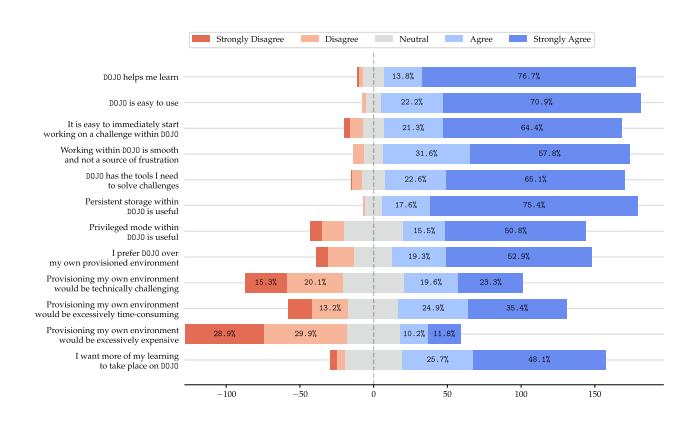
Figure 3: Survey Responses to 5-point Likert scale questions from 200 students about their experience with DOJO.
interaction in this model, rather than the difficulty of the challenges themselves. When we implemented the sharing of the host filesystem between the challenge container and the vulnerable VM, student frustration with interaction issues dropped to near-zero.
5 EVALUATION
We conducted an IRB-exempt (minimal harm) survey to evaluate the impact of the latest version of DOJO on student learning experience. We received 200 responses from DOJO users around the world (including, but not limited to, students at our institution). Feedback excerpts are replicated throughout the paper, and results of the quantitative portion of the survey are summarized in Figure 3, clearly showing that students overwhelmingly prefer the DOJO over even their own local environments.
We also analyzed the data according to gender. Of gender reporting respondents, 89% identified as Male, 9% as Female, and 2% as other responses. DOJO is more overwhelmingly preferred by non-Male students than by Male students. While 70.5% of Male students prefer using the DOJO, 94.4% of Female students and 100% of non-binary/other students do so. Similarly, a higher portion of non-Male students (55.6% of Female students and 75% of Other students, compared to 41% of Male students) had more concerns with the technical challenge of provisioning their own environments. In a field struggling with gender inclusivity, we feel that any leveling of the playing field is important, and hope that the DOJO can be a part of the puzzle of increasing the gender balance in Cybersecurity.
6 CONCLUSION
We developed DOJO, a state-of-the-art, open-source learning platform for hands-on cybersecurity education that aims to minimize barriers for both students and instructors. We described its features, delved into technical implementation details, discussed implications and our experience, and presented a survey of student experiences. DOJO has been successfully used in multiple university courses and workshops, is open source, and is available for free to the world. More than 10,000 students from around the world have already benefited from using DOJO, and we hope that this is just the beginning.
Acknowledgments. This work would not have been possible without the vibrant enthusiasm of the pwn.college community, and the generous support of the Department of Defense; thank you.
REFERENCES
- [1] Masooda Bashir, April Lambert, Jian Ming Colin Wee, and Boyi Guo. 2015. An Examination of the Vocational and Psychological Characteristics of Cybersecurity Competition Participants. In 2015 USENIX Summit on Gaming, Games, and Gamification in Security Education (3GSE 15).
- [2] Fabrice Bellard. 2005. QEMU, a Fast and Portable Dynamic Translator. In USENIX annual technical conference, FREENIX Track, Vol. 41. Califor-nia, USA, 10–5555.
- [3] Razvan Beuran, Dat Tang, Cuong Pham, Ken-ichi Chinen, Yasuo Tan, and Yoichi Shinoda. 2018. Integrated framework for hands-on cybersecurity training: CyTrONE. Computers & Security 78 (2018), 43–59.
- [4] Hack The Box. 2023. https://www.hackthebox.com/.
- [5] Root The Box. 2023. https://github.com/moloch--/RootTheBox.
- [6] Martin Carlisle, Michael Chiaramonte, and David Caswell. 2015. Using CTFs for an Undergraduate Cyber Education. In 2015 USENIX Summit on Gaming, Games, and Gamification in Security Education (3GSE 15).
- [7] Peter Chapman, Jonathan Burket, and David Brumley. 2014. PicoCTF: A Game-Based Computer Security Competition for High School Students. In 2014 USENIX Summit on Gaming, Games, and Gamification in Security Education (3GSE 14).
- [8] Kevin Chung. 2017. Live Lesson: Lowering the Barriers to Capture The Flag Administration and Participation. In 2017 USENIX Workshop on Advances in Security Education (ASE 17).
- [9] VS Code. 2023. https://code.visualstudio.com/.
- [10] William Crumpler and James A Lewis. 2019. The cybersecurity workforce gap. JSTOR.
- [11] CTFtime. 2023. https://ctftime.org/.
- [12] Michael H Dunn and Laurence D Merkle. 2018. Assessing the Impact of a National Cybersecurity Competition on Students' Career Interests. In Proceedings of the 49th ACM Technical Symposium on Computer Science Education. 62–67.
- [13] Joshua Eckroth, Kim Chen, Heyley Gatewood, and Brandon Belna. 2019. Alpaca: Building Dynamic Cyber Ranges with Procedurally-Generated Vulnerability Lattices. In Proceedings of the 2019 ACM Southeast Conference. 78–85.
- [14] Facebook. 2023. https://github.com/facebookarchive/fbctf.
- [15] GitHub. 2021. GitHub Feature: Codespaces. https://github.com/features/ codespaces/
- [16] GitHub. 2021. GitHub's Engineering Team has moved to Codespaces. https: //github.blog/2021-08-11-githubs-engineering-team-moved-codespaces/
- [17] Google. 2023. https://github.com/google/kctf.
-
[18] ISACA. 2022. State of Cybersecurity 2022: Global Update on Workforce Efforts, Resources and Cyberoperations. Technical Report. ISACA.
- [19] Stylianos Karagiannis, Emmanouil Magkos, Christoforos Ntantogian, and Luís L Ribeiro. 2020. Sandboxing the Cyberspace for Cybersecurity Education and Learning. In European Symposium on Research in Computer Security. Springer, 181–196.
- [20] David J Malan. 2022. Standardizing Students' Programming Environments with Docker Containers: Using Visual Studio Code in the Cloud with GitHub Codespaces. In Proceedings of the 27th ACM Conference on on Innovation and Technology in Computer Science Education Vol. 2. 599–600.
- [21] David J Malan, Jonathan Carter, Rongxin Liu, and Carter Zenke. 2022. Providing Students with Standardized, Cloud-Based Programming Environments at Term's Start (for Free). In Proceedings of the 54th ACM Technical Symposium on Computer Science Education V. 2. 1183–1183.
- [22] Jelena Mirkovic and Peter AH Peterson. 2014. Class Capture-the-Flag Exercises. In 2014 USENIX Summit on Gaming, Games, and Gamification in Security Education (3GSE 14).
- [23] Moodle. 2023. https://moodle.com/.
- [24] Mike O'Leary. 2017. Innovative Pedagogical Approaches to a Capstone Laboratory Course in Cyber Operations. In Proceedings of the 2017 ACM SIGCSE Technical Symposium on Computer Science Education. 429–434.
- [25] Order Of The Overflow. 2023. https://archive.ooo/.
- [26] KYPO Project. 2022. https://gitlab.ics.muni.cz/groups/muni-kypo-crp/-/epics/25.
- [27] pwnable.kr. 2023. https://pwnable.kr/.
- [28] pwnable.tw. 2023. https://pwnable.tw/.
- [29] ret2. 2023. https://wargames.ret2.systems/.
- [30] Z Cliffe Schreuders, Thomas Shaw, Mohammad Shan-A-Khuda, Gajendra Ravichandran, Jason Keighley, and Mihai Ordean. 2017. Security Scenario Generator (SecGen): A Framework for Generating Randomly Vulnerable Rich-scenario VMs for Learning Computer Security and Hosting CTF Events. In 2017 USENIX Workshop on Advances in Security Education (ASE 17).
- [31] SecDevOps@Cuse. 2023. https://github.com/secdevops-cuse/CyberRange.
- [32] TryHackMe. 2023. https://tryhackme.com/.
- [33] Giovanni Vigna, Kevin Borgolte, Jacopo Corbetta, Adam Doupe, Yanick Fratantonio, Luca Invernizzi, Dhilung Kirat, and Yan Shoshitaishvili. 2014. Ten Years of iCTF: The Good, The Bad, and The Ugly. In 2014 USENIX Summit on Gaming, Games, and Gamification in Security Education (3GSE 14).
- [34] Jan Vykopal, Radek Ošlejšek, Pavel Čeleda, Martin Vizvary, and Daniel Tovarňák. 2017. KYPO Cyber Range: Design and Use Cases. In Proceedings of the 12th International Conference on Software Technologies - Volume 1: ICSOFT. SciTePress, 310–321.
- [35] Over The Wire. 2023. https://overthewire.org/wargames/.